
Working on a phone
On a phone each day is a list of cards, one per stop, and every card is editable in place. Tap a value to change it.
Compact and Detail
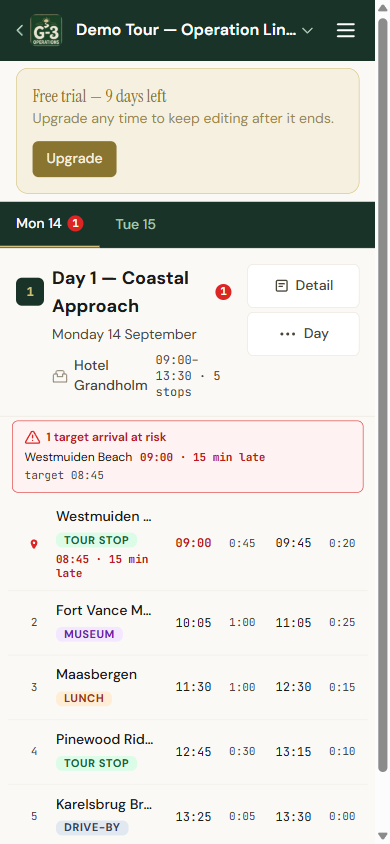
Section titled “Compact and Detail”The button in the day header switches between two views.
- Compact is the dense one: name, badge, arrive, on site, depart, drive. Read-only. Good for checking the day at a glance. A stop that will miss its target arrival gets a red line under its arrive time saying by how much.
- Detail is the full card with every field. Tap a row in compact view and you land in detail on that stop.
The button shows the view you would switch to: it reads Detail while you are in compact, and Compact while you are in detail.
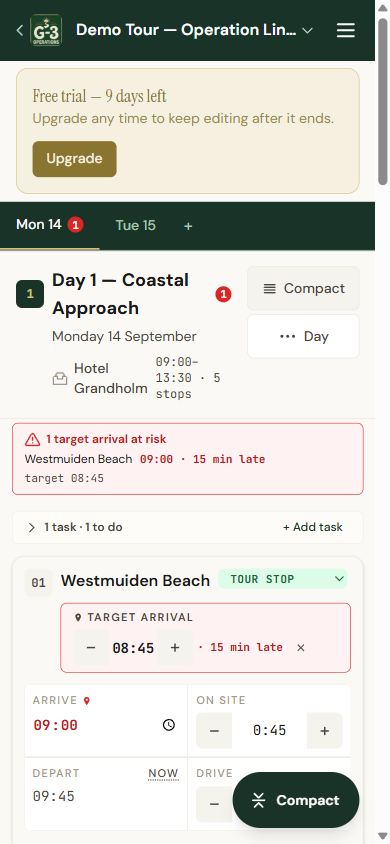
In detail view a round Compact button sits at the bottom right. It takes you back to the compact list at the stop you were looking at.
Typing times
Section titled “Typing times”Times are 24-hour. 9:30, 09:30 and 0930 all work. Durations take 1:30, 1h30, 90 for ninety minutes, or 1.5 for an hour and a half. If what you typed makes no sense, the field quietly goes back to what it was.
The plus and minus on a duration step by five minutes.
Moving stops
Section titled “Moving stops”No dragging on a phone. Use Move up and Move down on the stop’s card.
Signal
Section titled “Signal”The app keeps working on what it already has and sends your changes when signal returns.