
Plus Codes and drive times
Put a Google Maps Plus Code on each stop, open the Day menu, choose Calculate driving times. Empty drive fields fill in; ones you typed are left alone.
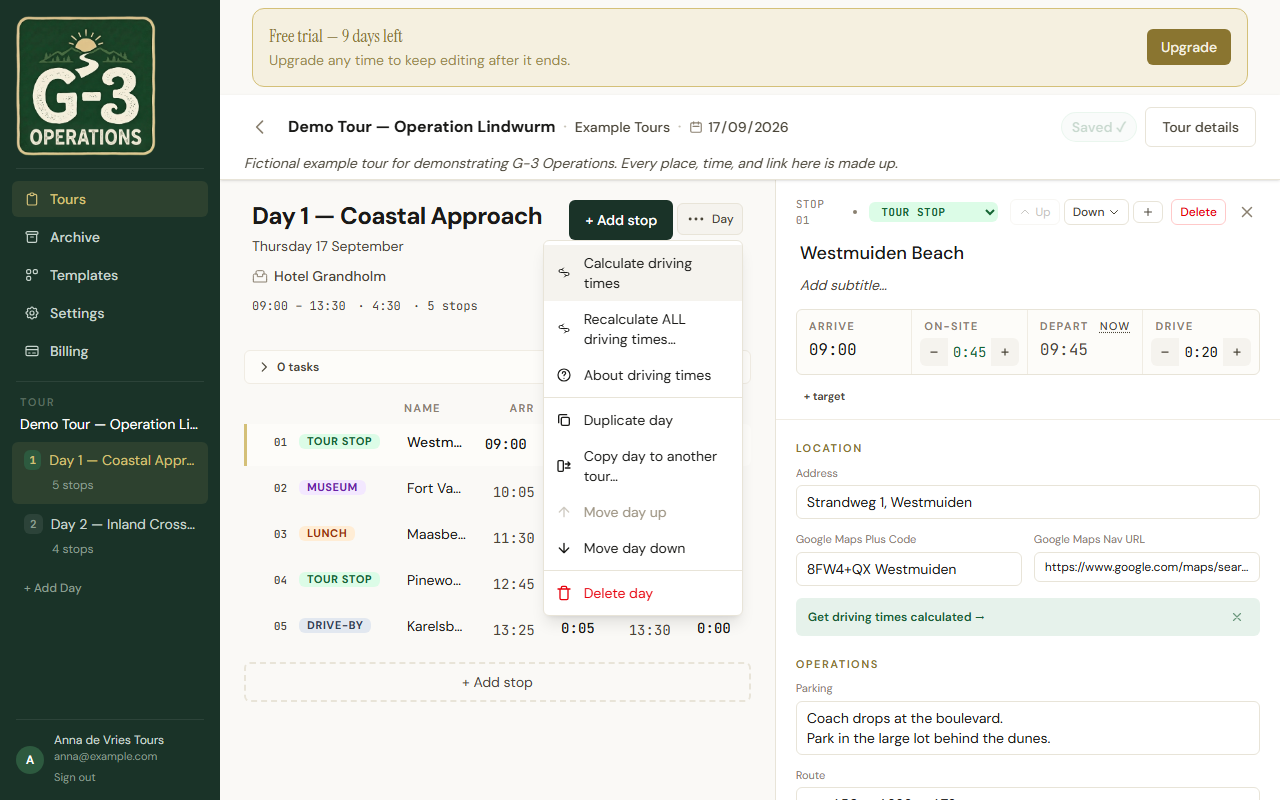
Plus Codes
Section titled “Plus Codes”In Google Maps, a place’s Plus Code looks like CFQM+94 Eindhoven: a short code plus a town. Paste that whole thing into Google Maps Plus Code. A full code with no town, the longer kind starting with the area, works too. A short code without the town does not; the app cannot know which town it means.
The address field is for people. Routing runs on the Plus Code only.
What you get
Section titled “What you get”Drives are computed for a coach unless the tour is set to By car, and rounded up to the next five minutes. Traffic is not included. Add your own margin where you know the road.
The result panel tells you what it did: We have filled the driving times for 5 of 6 legs, and why not the sixth:
- No Plus Code yet
- Plus Code not recognised
- Plus Code looks wrong — far from the rest of the day
- Couldn’t find the town in this Plus Code
- No route found, with the stop named, for a code in the sea or on an island
Recalculate ALL driving times… overwrites every drive on the day, including ones you typed. Use it after a big reorder.
The hotel in the day header is a label, not a stop. To get the drive back to it, add the hotel as the last stop with its own Plus Code.
Typing a drive yourself
Section titled “Typing a drive yourself”The drive field is an ordinary field. Type over any computed value. The next Calculate leaves it alone.