Tasks and driver actions
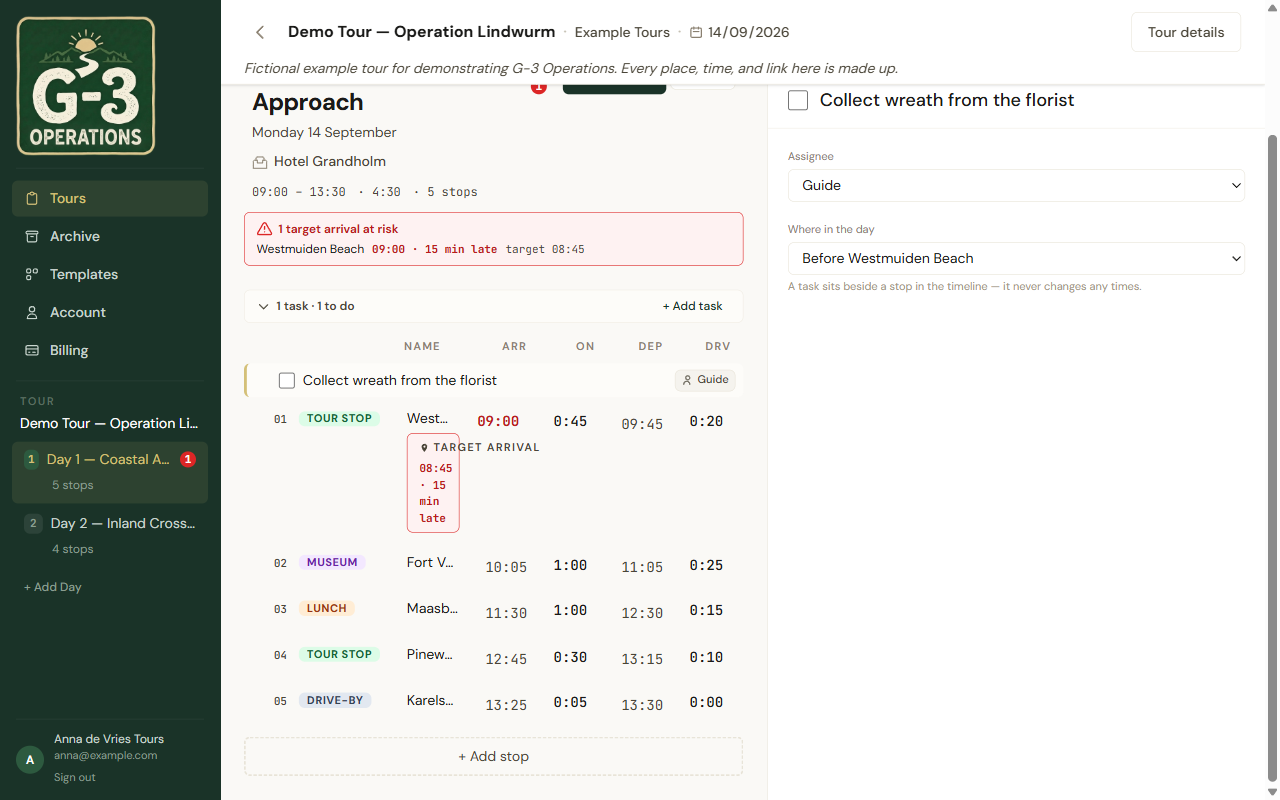
A task is a reminder pinned beside a stop. It has no times and never moves the day.
The task bar under a day says how many there are and how many are still to do. + Add task creates one, anchored before the first stop. Open it and you get:
- a Label, the thing to do;
- an Assignee;
- Where in the day: a list of Before and After every stop on the day;
- a done checkbox.
Tasks show up in the timeline where you anchored them, styled like a stop but without times. Drivers never see them.
Needs re-anchor
Section titled “Needs re-anchor”Delete a stop and any task anchored to it is moved to the nearest surviving stop and marked Needs re-anchor in amber. Nothing is lost. Open the task, pick a stop under Where in the day, and the badge goes.
Driver actions
Section titled “Driver actions”A stop can carry driver actions: instructions the driver gets as extra screens after the stop itself, swiped through one at a time. Add them from the Driver actions section of the stop. The driver’s list view shows a +N on a stop that has them.
In a spreadsheet export, driver actions live in the column headed Driver Actions — machine data, do not edit. Leave it alone and it survives the round trip.